How to Use AI Text Humanizer
What Is AI Text Humanizer?
AI Text Humanizer is your secret weapon for transforming robotic, AI-generated content into natural, engaging, human-like text. If you've ever used ChatGPT, GPT-5, Claude, or Gemini to write content, you know the output can sometimes sound mechanical or formulaic. That's where our humanizer comes in—it takes that AI-generated text and rewrites it to sound like it was written by a real person, complete with natural flow, varied sentence structures, and authentic human expression.
The best part? Our humanizer doesn't just change a few words—it intelligently restructures your content to bypass even the most advanced AI detection tools like Turnitin, GPTZero, Copyleaks, and others. We achieve consistent success in making AI content highly undetectable while preserving your original message and meaning.
Why Use AI Text Humanizer?
There are countless situations where humanizing AI-generated text is not just helpful—it's essential:
- Academic Writing: Students can use AI assistance while ensuring their work sounds authentically personal and passes AI detection
- Content Creation: Bloggers and marketers can produce content faster with AI, then humanize it for better reader engagement
- Professional Communication: Business professionals can draft emails and reports with AI, then make them sound naturally professional
- SEO Optimization: Website owners can create AI-assisted content that search engines won't penalize
- Social Media: Influencers and brands can maintain an authentic voice while leveraging AI efficiency
Complete Guide: How to Use AI Text Humanizer
Step 1: Start with Your AI-Generated Text
First, create your content using any AI writing tool you prefer—ChatGPT, Claude, Gemini, GPT-5, or any other AI model. Don't worry about making it sound perfect at this stage; our humanizer will handle that. Simply generate your draft, whether it's a blog post, essay, email, article, or any other type of written content.
Important Note: You can humanize up to 750 words per input for optimal processing quality. If you have a longer document, simply break it into smaller sections and process each one separately.
Step 2: Access the AI Text Humanizer
Navigate to our AI Text Humanizer page. You'll be greeted by an intuitive interface designed for ease of use. No login or credit card is required—use the tool for free with no word limit during our free trial and see the transformation quality right away.
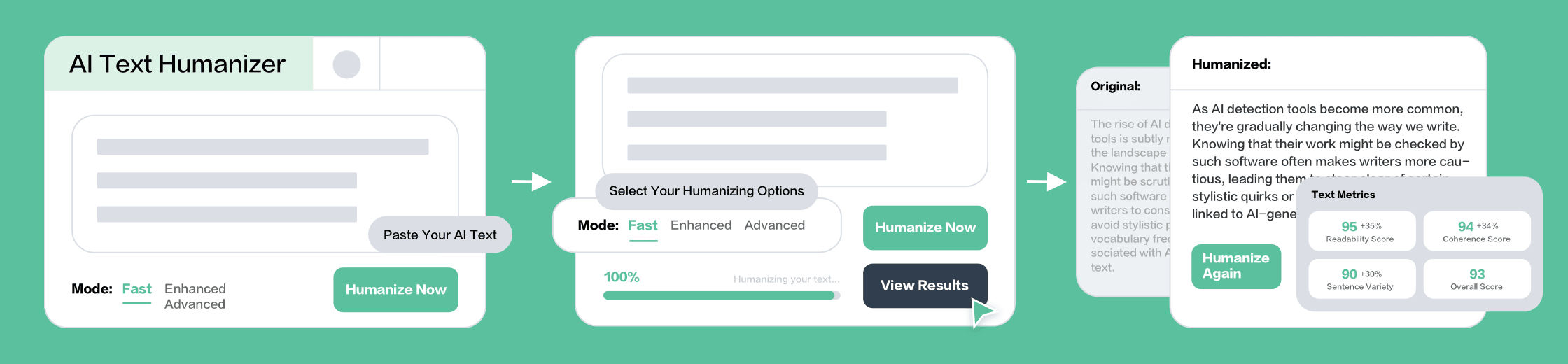
Step 3: Paste Your AI Text
Copy your AI-generated content and paste it into the large input box on the page. The tool will automatically count your words and display the count in real-time, so you always know where you stand with your quota. You can paste content in any major language—our humanizer supports English, Spanish, French, German, and many other languages.
Step 4: Choose Your Humanization Mode
This is where the magic happens! We offer three distinct modes, each designed for different needs:
Fast Mode - Quick Natural Touch
Perfect for: Emails, social media posts, quick communications
What it does: Makes subtle but effective changes to remove that robotic AI feeling. It simplifies the longest sentences, replaces overly formal vocabulary with natural alternatives, and removes obvious AI embellishments. Your text keeps its basic structure but sounds noticeably more human.
Best for: When you need quick results and your original text is already pretty good, just needs that human touch.
Enhanced Mode - Recommended for Most Users
Perfect for: Blog posts, articles, marketing content, professional documents
What it does: This is our most popular mode and for good reason. It performs a significant rewrite that makes your content exceptionally clear, direct, and easy to understand. The Enhanced mode breaks down complex sentences, eliminates all literary devices and metaphors that AI loves to use, replaces sophisticated vocabulary with everyday language, and adds personal pronouns where appropriate. The result is content that sounds confident, straightforward, and unmistakably human.
Best for: When you want strong humanization that definitely bypasses AI detectors while maintaining professional quality.
Advanced Mode - Complete Transformation
Perfect for: Academic papers, thought leadership content, persuasive writing, high-stakes documents
What it does: This mode goes all-in with a deep rewrite. It adopts a "no-nonsense expert" persona—imagine someone giving you straight, direct advice without any fluff. Advanced mode uses extremely simple language, very short declarative sentences, and structures content like a memo or direct advice. It heavily utilizes second person ("you") or first person ("we") to create a strong personal viewpoint. This mode completely transforms your text while preserving every essential point of your original message.
Best for: When you need maximum humanization and want an authoritative, opinionated, highly engaging tone.
Step 5: Click "Humanize"
Once you've selected your mode, simply click the "Humanize" button with the magic wand icon. Our advanced AI humanization engine immediately begins working on your text. You'll see a progress indicator with "Humanizing your text..." followed by "Humanization completed!" The entire process typically takes just seconds, even for longer pieces.
Step 6: Review Your Humanized Text
Your results page will display both your original and humanized text side by side, making it easy to compare the transformation. You'll also receive:
- Before and After Comparison: See exactly how your content has been improved
- Highlighted Changes: Visual indicators showing what was modified
- Writing Tips: Actionable suggestions for improving your writing in the future
- AI Detection Score: Confirmation that your humanized text now bypasses AI detectors
Step 7: Use Your Humanized Content
Simply copy your new, humanized text and use it wherever you need! Whether you're submitting an assignment, publishing a blog post, sending professional emails, or posting on social media, your content now sounds authentically human and will pass AI detection tools with flying colors.
Pro Tips for Best Results
Want to get the absolute most out of AI Text Humanizer? Follow these expert recommendations:
- Start with Quality AI Output: The better your original AI text, the better the humanized result. Use detailed prompts when generating initial content
- Choose the Right Mode: Match the mode to your content type—Fast for casual, Enhanced for professional, Advanced for academic or persuasive
- Process in Sections: For very long documents, break them into logical sections (750 words each) for more consistent tone
- Review and Personalize: While our humanizer is excellent, adding a few personal touches or examples makes content even more authentic
- Test Different Modes: Try the same text in different modes to see which output you prefer—everyone has different style preferences
- Combine with Manual Editing: For critical documents, use the humanizer for the heavy lifting, then add your final personal polish
What Makes Our AI Text Humanizer Superior?
You might wonder what sets our humanizer apart from competitors. Here's the truth:
- Proven Effectiveness: Our humanizer consistently bypasses Turnitin, GPTZero, Copyleaks, and all major AI detection tools with high success rates
- Meaning Preservation: Unlike some tools that completely change your message, we maintain your core ideas while transforming the expression
- Three Specialized Modes: Instead of one-size-fits-all, we offer modes tailored to different writing needs and contexts
- Multilingual Excellence: Humanize content in multiple languages with the same high quality
- Sentence Structure Variation: We don't just swap words—we intelligently restructure sentences to avoid AI patterns
- Natural Flow Enhancement: Your humanized text doesn't just pass detection—it reads better and engages readers more effectively
- Lightning-Fast Processing: Get results in seconds, not minutes, so you can maintain your workflow momentum
Common Questions Answered
Will humanization change my content's meaning?
No! This is our top priority. Our humanizer transforms how your content is expressed while carefully preserving every essential point and piece of information from your original text.
How many times should I humanize the same text?
Usually once is enough! Our humanizer is designed to fully transform text in a single pass. However, if you want to try a different mode or tone, you can always humanize again.
Can I humanize already-humanized text?
While you can, it's not necessary. Our humanizer already produces human-like output that bypasses detection. Running it multiple times might make the text overly simple.
Free to Use
Use our AI Text Humanizer for free during our free trial—no login required and no word limit. Enjoy the same powerful humanization algorithms with no sign-up or payment.
Your Path to Undetectable, Natural Content
Using AI Text Humanizer is the smartest way to combine AI efficiency with human authenticity. You get content created quickly with AI tools, then transformed into natural, engaging text that readers love and AI detectors can't identify. Whether you're a student, professional, marketer, or content creator, our humanizer empowers you to produce your best work faster. Try it now for free and experience the difference that professional-grade humanization makes!